2nd May 2004
Amended 25th July 2021
As of 10th April 2006 the software discussed in this article can be downloaded from www.radicore.org
I am no stranger to software development having been a software engineer for over 25 years. I have developed in a variety of 2nd, 3rd and 4th generation languages on a mixture of mainframes, mini- and micro-computers (which are now called Personal Computers). I have worked with flat files, indexed files, hierarchical databases, network databases and relational databases. The user interfaces have included punched card, paper tape, teletype, block mode, CHUI, GUI and web. I have written code which has been procedural, model-driven, event-driven, component-based and object oriented. I have built software using the 1-tier, 2-tier and the 3-Tier architecture. I have created development infrastructures in 3 different languages. My latest achievement is to create an environment for building web applications using PHP that encompasses a mixture of 3-Tier architecture, OOP, and where all HTML output is generated using XML and XSL transformations. This is documented in A Development Infrastructure for PHP.
Before teaching myself PHP the only occasion where I came in contact with the concept of the model-view-controller design pattern was when I joined a team that was replacing a legacy system with a more up-to-date version that had web capabilities. I was recruited because of my experience with the language being used, but I quickly realised that their design was too clumsy and the time taken to develop individual components was far to long (would you believe two man-weeks for a SEARCH screen and a LIST screen?). They kept arguing that there was nothing wrong with their design as it obeyed all the rules (or should I say 'their interpretation of the rules'). I was not the only one who thought their implementation was grossly inefficient - the client did not like their projected timescales and costs so he cancelled the whole project. How's that for a vote of confidence for their design!
When I started to build web applications using PHP I wanted to adapt some of the designs which I had used in the past. Having successfully implemented the 3-Tier architecture in my previous language I wanted to attempt the same thing using PHP. My development infrastructure ended up with the following sets of components:
Although I have never been trained in OO techniques I read up on the theory and used the OO capabilities of PHP 4 to produce a simple class hierarchy that had as much reusable code as possible in an abstract superclass and where each business entity was catered for with a concrete subclass. I published an article Using PHP Objects to access your Database Tables (Part 1) and (Part 2) which described what I had done, and I was immediately attacked by self-styled OO purists who described my approach as "totally wrong" and "unacceptable to REAL object-oriented programmers". I put the question to the PHP newsgroup and asked the opinion of the greater PHP community. This generated a huge response that seemed to be split between the "it is bad" and "it is good" camps, so I summarised all the criticisms, and my responses to those criticisms, in a follow-up article entitled What is/is not considered to be good OO programming.
I have absolutely no doubt that there will be some self-styled MVC purists out there in Internet land who will heavily criticise the contents of this document, but let me give you my response in advance:
| I DO NOT CARE! |  |
I have read the principles of MVC and built software which follows those principles, just as I read the principles of OOP and built software which followed those principles. The fact that my implementation is different from your implementation is totally irrelevant - it works therefore it cannot be wrong. I have seen implementations of several design patterns which were technical disasters, and I have seen other implementations (mostly my own) of the same design patterns which were technical successes. Following a set of principles will not guarantee success, it is how you implement those principles that separates the men from the boys. The principles of the various design patterns are high-level ideas which are language-independent, therefore they need to be translated into workable code for each individual language. This is where I have succeeded and others have failed. I have spent the last 25+ years designing and writing code which works, and I don't waste my time with ideas that don't work. Other people seem to think that following a set of rules with blind obedience is the prime consideration and have no idea about writing usable or even efficient code. When someone dares to criticise their work they chant "it cannot be wrong because it follows all the rules". The difference between successful and unsuccessful software is not in the underlying rules or principles, it is how those rules or principles are implemented that counts. Where implementation 'A' makes it is easier and quicker to develop components than implementation 'B', it does not mean that 'A' is right and 'B' is wrong, it just means that 'A' is better than 'B'. Where an implementation works it cannot be wrong - it can only be wrong when it does not work.
After researching various articles on the internet I came up with the following descriptions of the principles of the Model-View-Controller design pattern:
The MVC paradigm is a way of breaking an application, or even just a piece of an application's interface, into three parts: the model, the view, and the controller. MVC was originally developed to map the traditional input, processing, output roles into the GUI realm:Input --> Processing --> Output
Controller --> Model --> View
Note that the model may not necessarily have a persistent data store (database), but if it does it may access it through a separate Data Access Object (DAO).
In the Java language the MVC Design Pattern is described as having the following components:
The purpose of the MVC pattern is to separate the model from the view so that changes to the view can be implemented, or even additional views created, without having to refactor the model.
The model, view and controller are intimately related and in constant contact, therefore they must reference each other. Figure 1 below illustrates the basic Model-View-Controller relationship:
Figure 1 - The basic MVC relationship
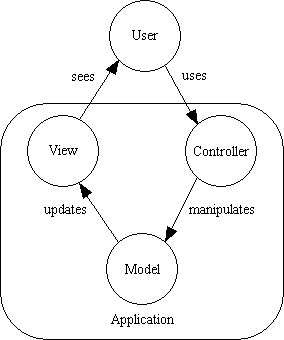
Even though the above diagram is incredibly simple, there are some people who try to read more into it than is really there, and they attempt to enforce their interpretations as "rules" which define what is "proper" MVC. To put it as simply as possible the MVC pattern requires the following:
Note the following:
There are some people who criticise my interpretation of the "rules" of MVC as it is different from theirs, and therefore wrong (such as how data moves from the Model to the View), but who is to say that their interpretation is the only one that should be allowed to exist? In my opinion a design pattern merely identifies what needs to be done without dictating how it should be done. Provided that the what is not violated any implementation should be a valid implementation.
I do not develop software which directly manipulates real-world objects, such as process control, robotics, avionics, or missile guidance systems, which means that a lot of the properties and methods which apply to real-world objects are completely irrelevant. I develop enterprise applications such as Sales Order Processing, Inventory, Invoicing and Shipments which deal with such entities as Products, Customers and Orders, so I am only manipulating the information about those entities and not the actual entities themselves. This information is held in a database in the form of tables, columns and relationships. Regardless of what properties or attributes a real-world object may have, in a database application it is only necessary to store those pieces of information that are actually required by that application. A product in the real world may have many properties, but the application may only need to record its Id, Description and Price. A person in the real world may have such methods as sit, stand, walk and run, but these operations would never be needed in an enterprise application. Regardless of the operations that can be performed on a real-world object, with a database table the only operations that can be performed are Create, Read, Update and Delete (CRUD). Following the process called data normalisation the information for an entity may need to be split across several tables, each with its own columns and relationships, and in these circumstances I would create a separate Model class for each table instead of having a single class for a collection of tables.
As a transaction processing application is divided into a number of user transactions (use cases), it would be wise to have a separate controller for each use case instead of a single universal controller which can deal with all possible use cases. Some people advocate the creation of a separate controller for each Model, such as in GRASP - The Controller which states the following:
A use case controller should be used to deal with all system events of a use case, and may be used for more than one use case (for instance, for use cases Create User and Delete User, one can have a single UserController, instead of two separate use case controllers).
I do not have a separate Controller for each Model (business entity). Each user transaction (task) does something with a database table, so I have placed the "something" into a reusable controller script, then use a component script to identify which table (model) should be the subject of that action. Because each business entity is a database table, and each database table has exactly the same set of operations, I have designed my controllers around the operations that can be performed on an unspecified database table where the name of that table is not known until run time. So instead of such controllers as Create User and Delete User, Create Product and Delete Product, Create Order and Delete Order I simply have Create Table and Delete Table. These controllers can be used with any table in any database, and because they have been reduced to this level of simplification they can be supplied as standard framework components and do not need to be created or modified by any developer. There is a separate controller for each of my Transaction Patterns.
In my implementation, as shown in Figure 2 and Figure 3, the whole application is broken down into a series of top-level components which are sometimes referred to as tasks, actions, functions, operations or user transaction, each of which is may be related to a single Use Case. Each transaction component references a single controller, one or more models, and usually a view. Some components do not have a view as they are called from other components in order to perform a service, and once this service has been completed they return control to the calling component. Each component is self-executing in that it deals with both the HTTP GET and POST requests.
Figure 2 - My implementation of the MVC pattern (1)
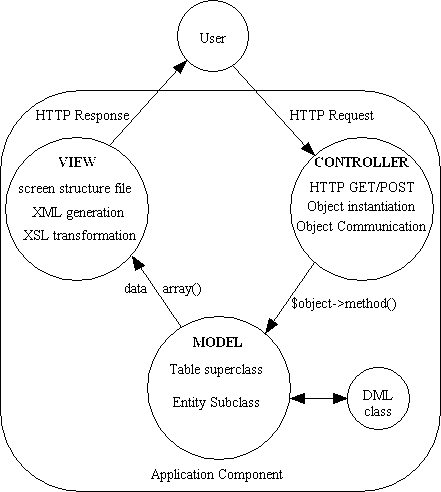
If output in an alternative format is required, such as PDF instead of HTML, there are separate transaction patterns which use a different view object to create PDF output in either LIST view or DETAIL view, each with its own report structure file. There is also another view object to create CSV output.
Note that my implementation of MVC differs from the Java implementation in the following ways:
Figure 2a shows a slightly(?) more complicated implementation which I found at oracle.com. Thank goodness I decided not to choose Java as my next programming language!
Figure 2a - A Java implementation of the MVC pattern
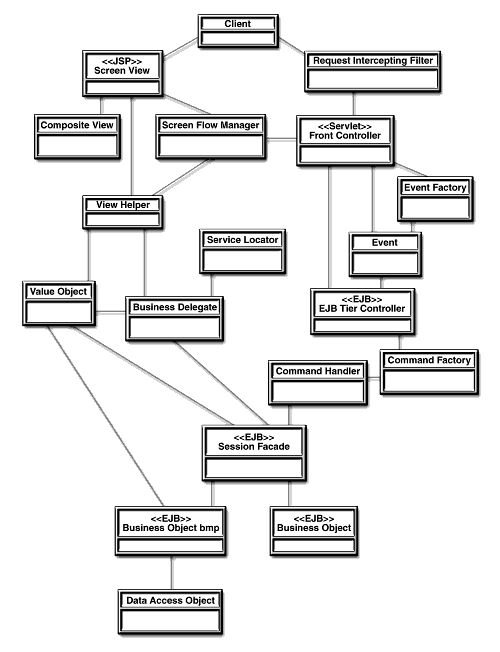
Also note that, unlike the Java implementation, I do not use any of the following design patterns - Filter, Helper, Composite, Front Controller, Value Object, Facade or Delegate. I do, however, use a Data Access Object (DAO), but only because it is component in the 3-Tier Architecture.
Figure 3 - My implementation of the MVC pattern (2)
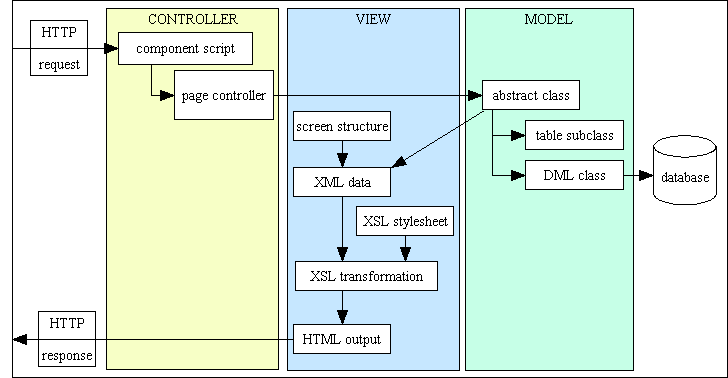
Note that all the items in the above diagram are clickable links.
As I said in the introduction, my implementation of MVC is combined with the 3-Tier Architecture which has separate layers for Presentation logic, Business logic and Data Access logic. How the two can interact is shown in Figure 4:
Figure 4 - The MVC and 3-Tier architectures combined
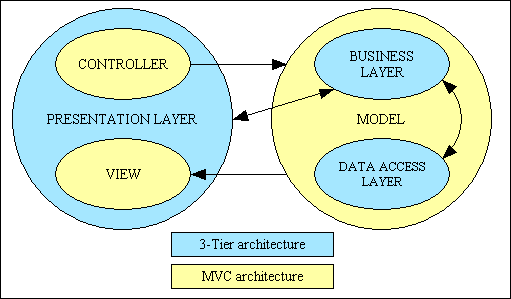
This implementation has very high Levels of Reusability due to the number of components which are either pre-written and come supplied with the framework, or are generated by the framework.
This component is comprised of the following:
The Model is never supposed to handle the output of its data to any particular device or medium. Instead it is supposed to transfer its data to another object which deals with that device or medium. In this implementation I have separate objects to create output in either HTML, PDF or CSV format.
The HTML component operates as follows:
The PDF component operates as follows:
The CSV component operates as follows:
Note that some components may not have a view at all as they perform a service without producing any visible output.
This component is comprised of the following:
My implementation also has the following characteristics:
Each of the components can be classified as one of the following:
Some of these components are built into the framework while others you have to generate yourself:
Components are either application-agnostic or framework-agnostic:
All communication between the various components is as follows:
All default behaviour is provided by the framework components, so when a developer wishes to alter the default behaviour the only code that he/she has to write goes into one of the pre-prepared methods in a Model class. This also means that, as the author of the framework, I can alter or enhance the default behaviour of any component within the application simply by changing a framework component. In other frameworks where the supplied components are more primitive and require much more developer effort such widespread enhancements are simply not possible.
Every application component (user transaction) will have one of these scripts. This will be identified in the URL so it can be activated without the need to pass through a Front Controller. It is a very small script which does nothing but identify which model (business entity), view (screen structure file) and controller to use, as shown in the following example:
<?php
//*****************************************************************************
// This will allow a single occurrences of a database table to be updated.
// The identity of the selected occurrence is passed down from the previous screen.
//*****************************************************************************

$table_id = "mnu_user";                      // identifies the model
$screen   = 'mnu_user.detail.screen.inc';    // identifies the view
require 'std.update1.inc';                   // activates the controller

?>
Where the controller requires access to more than one business entity, such as in a parent-child or one-to-many relationship in a LIST2 pattern, or a parent-child-grandchild relationship in a LIST3 pattern, then names such as $parent_id, $child_id, $outer_id or $inner_id are used.
The same screen structure file can used by components which access the same business entity but in different modes (insert, update, enquire, delete and search) as the XSL stylesheet is provided with a $mode parameter which enables it to determine whether fields should be read-only or amendable.
Note that no component script is allowed to access more than one view. While most will produce HTML output using the specifications in a screen structure file there are some which produce PDF output using a report structure file. Some components may have no view at all - they are called upon to take some particular action after which they return control to the calling component which refreshes its own view accordingly.
Each of these is generated from a component in the Data Dictionary.
There are more details available in the RADICORE Infrastructure guide.
There is a separate pre-built controller script included in the framework for each of the patterns identified in Transaction Patterns for Web Applications. By simply changing the name of the controller script the whole character of the component will change.
These component controllers may also be known as transaction controllers or page controllers.
The following is an example of controller std.update1.inc:
<?php
// *****************************************************************************
// This will allow a single database row to be displayed and updated.
// The primary key of the row is passed in $where from the previous screen.
// *****************************************************************************

require_once 'include.general.inc';

$mode = 'update';  // identify mode for xsl file

initSession();  // load session variables

if (isset($_POST['quit'])) {
    // cancel this screen, return to previous screen
    scriptPrevious(null, null, 'quit');
} // if

// define action buttons
$act_buttons['submitBtn']  = 'submit';  // do not use name 'submit' as this conflicts with javascript 'submit()' function.
$act_buttons['quit']       = 'cancel';

// create a class instance for the MAIN database table
require_once "classes/$table_id.class.inc";
if (isset($script_vars['dbobject'])) {
    // use data from previous instance for this script
    $dbobject = unserialize($script_vars['dbobject']);
} else {
    // create new instance for initial activation of this script
    $dbobject = new $table_id;
} // if

if ($_SERVER['REQUEST_METHOD'] == 'GET') {
    if (empty($where)) {
        scriptPrevious(getLanguageText('sys0081')); // 'Nothing has been selected yet.'
    } // if
    $fieldarray = $dbobject->getData($where);
    if ($dbobject->getNumRows() < 1) {
        scriptPrevious(getLanguageText('sys0085')); // 'Nothing retrieved from the database.'
    } // if
} elseif (!empty($_POST)) {
    $dbobject->startTransaction();
    $fieldarray = $dbobject->updateRecord($_POST);
    $messages = array_merge($messages, $dbobject->getMessages());
    if ($dbobject->errors) {
        $errors = $dbobject->getErrors();
    } // if
    if (empty($errors)) {
        $errors = $dbobject->commit();
    } // if
    if (!empty($errors)) {
        $dbobject->rollback();
    } // if
} // if

// save these variables for later in the same session
$script_vars['where']     = $where;
$script_vars['dbobject']  = serialize($dbobject);
$script_vars['scrolling'] = $scrolling;
$script_vars = updateScriptVars ($script_vars);

// build list of objects for output to XML data
$xml_objects[]['root'] = &$dbobject;

// build XML document and perform XSL transformation
$view = new radicore_view($screen_structure);
$html = $view->buildXML($xml_objects, $errors, $messages);
echo $html;
exit;

?>
The controller does not know the names of the business entities with which it is dealing - these are passed down as variables from the component script. It will append the standard '.class.inc' to each table name to identify the class file, then instantiate a separate object for each table. Note that I did say "entities" in the plural and not "entity" in the singular. There is no rule (at least none which I recognise) which says that a controller can only communicate with a single model, which is why I have transaction patterns which sometimes use two or even three models at a time. Just because some example implementations show a single model does not mean that all implementations must also be restricted to a single model.
The method names that the controller uses to communicate with each table object are the generic names which are defined within the abstract table class. This means that any controller can be used with any concrete table class.
The controller does not know the names of any fields with which it is dealing - what comes out of the business entity is a simple associative array of 'name=value' pairs which is passed untouched to the View object which will transfer the entire array to an XML document so that it can be transformed into HTML.
In any INPUT or UPDATE components the entire contents of the POST array is passed to the business entity as-is instead of one field at a time. Again this means that no field names have to be hard-coded into any controller script, thus increasing their re-usability.
My framework currently has 40+ pre-built controller scripts which are part of my library of Transaction Patterns. The same pattern can be used with virtually any business object in the application, thus making them loosely coupled and highly reusable.
There are more details available in the RADICORE Infrastructure guide.
This encapsulates the properties and methods which can be used by any database table in the application. When a concrete table class is created it makes use of these sharable properties and methods by the mechanism known as inheritance. The generic methods which are used by the Controller script when it calls a Business entity object are all defined with this abstract class, and as they are all then available to every concrete table class this enables the concept known as polymorphism.
There are more details available in the RADICORE Infrastructure guide.
This is responsible for all communication the database by constructing queries using the standard SQL Data Manipulation Language (DML) using instructions passed down from the calling Business Entity class. There is a separate DML class for each different DBMS engine, such as MySQL, PostgreSQL, Oracle and SQL Server, which means that the entire application can be switched from one DBMS to another simply by changing a single entry in the configuration file. This means that it is also possible to develop an application using one DBMS engine but deploy it to use another.
Note that this class does not have any inbuilt knowledge of any database or database table, so a single class can be used to access any table in any database.
There are more details available in the RADICORE Infrastructure guide.
Each business entity is implemented as a separate class so that it can encapsulate all the properties and methods of that entity in a single object. As each of these business entities also exists as a database table a great deal of common code can be shared by inheriting from the abstract table class.
In its initial form a concrete table class requires very little information to differentiate it from another database table - just the database name, the table name, and the table structure. Rather than having to create each class file manually, as of June 2005 these can be generated for you as described in A Data Dictionary for PHP Applications. This provides the following facilities:
The variables in the class constructor do not contain application data (that which passes through the object between the user and the database) but instead contain information about the application data. Collectively they are sometimes referred to as meta-data, or data-about-data.
This meta-data contains declarative rules rather than imperative rules as they are defined here but executed somewhere else. When the time comes (i.e. when the user presses a SUBMIT button on an HTML form) the user data passes from the Controller into the Model where it is passed to a validation object along with the meta-data, and it is the responsibility of the validation object to ensure that the user data conforms to those rules. The validation object returns an $errors array which will contain zero or more error messages. If there are any error messages then the operation is aborted.
The structure file is a simple PHP script which identifies the XSL stylesheet which is to be used and the application data which is to be displayed by that stylesheet. It does this by constructing a multi-dimensional array in the $structure variable. The following formats are available:
Each structure file has the following components:
| xsl_file | This identifies which XSL stylesheet to use. Note that the same stylesheet can be referenced in many different structure files. |
| tables | This associates the name of a zone within the XSL stylesheet with the name of some user data within the XML document. A stylesheet may contain several zones, and the XML document may contain data from several database tables, so it is important to identify which table data goes into which zone. Among the different zone names which you may see are main, inner, outer, middle and link. |
| zone columns | This allows you to specify attribute values for each table column in this zone.
The following keywords for column attributes are supported in the list/horizontal view:
Note that the 'align', 'valign' and 'class' attributes when added to a <COL> element in the HTML output are poorly supported in most browsers, so will be dealt with as follows:
NOTE: if your screen structure file contains two or more of the 'align|valign|class' attributes for the same field then they will be combined automatically into a single 'class' value, so code such as: $structure['main']['columns'][] = array('width' => '100', 'align' => 'right', 'valign' => 'middle', 'class' => 'foobar'); will be treated as if it were: $structure['main']['columns'][] = array('width' => '100', 'class' => 'right middle foobar'); |
| zone fields | This identifies which fields from the database table are to be displayed, and in which order. For a horizontal view (as in Figure 8) this identifies the columns going across the page. For a vertical view (see Figure 5) this identifies the rows going down the page. Note that each element within this array is indexed by a column number (horizontal view) or a row number (vertical view).
The following keywords for additional field attributes are supported in the detail/vertical view:
|
This is an example of a structure file to produce a standard 2-column DETAIL view as shown in Figure 5.
<?php
$structure['xsl_file'] = 'std.detail1.xsl';

$structure['tables']['main'] = 'person';

$structure['main']['columns'][] = array('width' => 150);
$structure['main']['columns'][] = array('width' => '*');

$structure['main']['fields'][] = array('person_id' => 'ID');
$structure['main']['fields'][] = array('first_name' => 'First Name');
$structure['main']['fields'][] = array('last_name' => 'Last Name');
$structure['main']['fields'][] = array('initials' => 'Initials');
$structure['main']['fields'][] = array('nat_ins_no' => 'Nat. Ins. No.');
$structure['main']['fields'][] = array('pers_type_id' => 'Person Type');
$structure['main']['fields'][] = array('star_sign' => 'Star Sign');
$structure['main']['fields'][] = array('email_addr' => 'E-mail');
$structure['main']['fields'][] = array('value1' => 'Value 1');
$structure['main']['fields'][] = array('value2' => 'Value 2');
$structure['main']['fields'][] = array('start_date' => 'Start Date');
$structure['main']['fields'][] = array('end_date' => 'End Date');
$structure['main']['fields'][] = array('selected' => 'Selected');
?>
Where each row contains only a single label followed by a single field the format of each entry is 'field' => 'label'.
Note that under some circumstances neither the field nor the label will be output, in which case the entire row will be dropped rather than showing an empty row. These circumstances are:
nodisplay attribute set in the $fieldspec array.'display-empty' => 'y' to the item in the ['zone']['fields'] array in the screen structure file. This will cause every cell in that row to be output, even if it is empty.When this information is written out to the XML document it will look something like the following:
  <structure>
    <main id="person">
      <columns>
        <column width="25%"/>
        <column width="*"/>
      </columns>
      <row>
        <cell label="ID"/>
        <cell field="person_id" />
      </row>
      <row>
        <cell label="First Name"/>
        <cell field="first_name"/>
      </row>
      <row>
        <cell label="Last Name"/>
        <cell field="last_name"/>
      </row>
      <row>
        <cell label="Initials"/>
        <cell field="initials"/>
      </row>

      ....

      <row>
        <cell label="Start Date"/>
        <cell field="start_date"/>
      </row>
      <row>
        <cell label="End Date"/>
        <cell field="end_date"/>
      </row>
    </main>
  </structure>
Here is an example of a screen structure file that will produce a multi-column DETAIL view as shown in Figure 6:
$structure['main']['fields'][1] = array('person_id' => 'ID',
                                        'colspan' => 5);

$structure['main']['fields'][2][] = array('label' => 'First Name');
$structure['main']['fields'][2][] = array('field' => 'first_name',
                                          'size' => 15);
$structure['main']['fields'][2][] = array('label' => 'Last Name');
$structure['main']['fields'][2][] = array('field' => 'last_name',
                                          'size' => 15);
$structure['main']['fields'][2][] = array('label' => 'Initials');
$structure['main']['fields'][2][] = array('field' => 'initials');

$structure['main']['fields'][4] = array('picture' => 'Picture',
                                        'colspan' => 5,
                                        'imagewidth' => 32,
                                        'imageheight' => 32);
....
$structure['main']['fields'][11] = array('value2' => 'Value 2',
                                         'colspan' => 5);

$structure['main']['fields'][12][] = array('label' => '<- this is an orphan label ->',
                                           'label-only' => 'y',
                                           'align' => 'center',
                                           'colspan' => 6);

$structure['main']['fields'][13][] = array('label' => 'Start Date');
$structure['main']['fields'][13][] = array('field' => 'start_date');
$structure['main']['fields'][13][] = array('label' => 'End Date');
$structure['main']['fields'][13][] = array('field' => 'end_date',
                                           'colspan' => 3);
Notice the following differences between this and the standard 2-column view:
'field' => 'label'label entry must be defined before the field entry.field without a label.label without a field unless you specify the label-only option.Each entry may include any of the following options:
colspan - will allow that field to span more than one column in the HTML table. Without it the remaining columns in that row would be blank.rowspan - similar to colspan, but allows the field to extend vertically for more than 1 row.cols - will override the value for multiline controls supplied in the $fieldspec array.rows - will override the value for multiline controls supplied in the $fieldspec array.align - specify horizontal alignment within this cell. See the HTML specification for details.valign - specify vertical alignment within this cell. See the HTML specification for details.size - will set the size of the textbox control for that field when data can be input or amended. This overrides the size value specified in the $fieldspec array. This option is available in both the detail/vertical and list/horizontal views.display-empty - if the field is not present in the XML file then by default neither the label nor the field will be displayed. This option will cause the empty row to be displayed instead of being dropped.label-only - this will cause a label to be printed on its own without an associated field value.class - will allow that label or field to be enclosed in a class attribute, where the class name should be defined in the CSS file.imagewidth - will override the value in the $fieldspec array when an image is displayed. This option is available in both the detail/vertical and list/horizontal views.imageheight - will override the value in the $fieldspec array when an image is displayed. This option is available in both the detail/vertical and list/horizontal views.javascript - see Inserting optional JavaScript for details.Here is an example of a screen structure file that will produce a multi-column DETAIL view as shown in Figure 7:
$structure['main']['fields'][1] = array('prod_feature_id' => 'ID',
                                        'colspan' => 3);
$structure['main']['fields'][2] = array('prod_feature_cat_id' => 'Category',
                                        'colspan' => 3);

$structure['main']['fields'][3][] = array('label' => 'Measurement Required?',
                                          'rowspan' => 2);
$structure['main']['fields'][3][] = array('field' => 'measurement_reqd',
                                          'rowspan' => 2);
$structure['main']['fields'][3][] = array('label' => 'Measurement');
$structure['main']['fields'][3][] = array('field' => 'measurement');
$structure['main']['fields'][4] = array('uom_id' => 'Unit of Measure',
                                        'display-empty' => 'y');

$structure['main']['fields'][5] = array('prod_feature_desc' => 'Description',
                                        'colspan' => 3);
Please note the following:
rowspan option to extend down into row 4.'display-empty' => 'y' entry will cause empty cells to be output instead. This avoids row 5 being moved up to take the position of the missing row 4, which is to the right of the first two cells and immediately below the last 2 cells in row 3.Please note that additional options may be specified for use with javascript, as shown in RADICORE for PHP - Inserting optional JavaScript - Hide and Seek.
This is an example of a structure file to produce a standard LIST view as shown in Figure 8.
<?php
$structure['xsl_file'] = 'std.list1.xsl';

$structure['tables']['main'] = 'person';

$structure['main']['columns'][] = array('width' => 5);
$structure['main']['columns'][] = array('width' => 70);
$structure['main']['columns'][] = array('width' => 100);
$structure['main']['columns'][] = array('width' => 100);
$structure['main']['columns'][] = array('width' => 100, 'align' => 'center', 'nosort' => 'y');
$structure['main']['columns'][] = array('width' => '*', 'align' => 'right');

$structure['main']['fields'][] = array('selectbox' => 'Select');
$structure['main']['fields'][] = array('person_id' => 'ID');
$structure['main']['fields'][] = array('first_name' => 'First Name');
$structure['main']['fields'][] = array('last_name' => 'Last Name');
$structure['main']['fields'][] = array('star_sign' => 'Star Sign', 'nosort' => 'y');
$structure['main']['fields'][] = array('pers_type_desc' => 'Person Type');
?>
The selectbox entry does not relate to any field from the database. It is a reserved word which causes a checkbox to be defined in that column with the label 'Select'.
The nosort entry (which can be specified in either of the columns and fields arrays) is optional and will prevent the column label from being displayed as a hyperlink which, when pressed, will cause the data to be sorted on that column.
In some cases it might be useful to display an empty column (no heading, no data), and this can be achieved by inserting a line in any of the following formats:
$structure['main']['fields'][] = array('blank' => '');
$structure['main']['fields'][] = array('null' => '');
$structure['main']['fields'][] = array('' => '');
It is also possible to use some of the field options which have been described previously:
['zone']['columns'] array will appear in the <colgroup> element of the HTML document.['zone']['fields'] array will appear in the <td> element of the HTML document.When this information is written out to the XML document it will look something like the following:
  <structure>
    <main id="person">
      <columns>
        <column width="5"/>
        <column width="70"/>
        <column width="100"/>
        <column width="100">/>
        <column width="100" align="center"/>
        <column width="*" align="right"/>
      </columns>
      <row>
        <cell label="Select"/>
        <cell field="selectbox"/>
      </row>
      <row>
        <cell label="ID"/>
        <cell field="person_id"/>
      </row>
      <row>
        <cell label="First Name"/>
        <cell field="first_name"/>
      </row>
      <row>
        <cell label="Last Name"/>
        <cell field="last_name"/>
      </row>
      <row>
        <cell label="Star Sign"/>
        <cell field="star_sign" nosort='y'/>
      </row>
      <row>
        <cell label="Person Type"/>
        <cell field="pers_type_desc"/>
      </row>
    </main>
  </structure>
As the screen structure file is loaded into memory at the start of each script but not used until the very end, you have the opportunity to make dynamic amendments to the structure before it is used to create and display the HTML output. This is explained in the following links:
There are more details available in the RADICORE Infrastructure guide.
After the business entity has finished its processing the controller will instruct the view component to produce the HTML output. It does this by putting all the relevant data into an XML document. This data comes from the following sources:
This document will then be transformed into HTML.
There are more details available in the RADICORE Infrastructure guide.
This is a standard process by which an XML document is transformed into HTML output using instructions contained within an XSL Stylesheet. This process is performed at the web server end by default, but it is also possible for it to be performed within the client browser, thus reducing the load on the server.
There are more details available in the RADICORE Infrastructure guide.
This is the document which is sent back to the client's browser is response to the request. Its content should conform to the (X)HTML specification which is supervised by the World Wide Web Consortium.
There are more details available in the RADICORE Infrastructure guide.
The framework contains a series of reusable XSL stylesheets each of which will present the data in one of the structures described in Transaction Patterns for Web Applications. These stylesheets are reusable because of one simple fact - none of them contain any hard-coded table or field names. Precise details of which elements from the XML file are to be displayed where are provided within the XML file itself from data obtained from a screen structure script which is placed into the <structure> element. This is a great improvement over my original software which required a separate version of a stylesheet for each component.
There are two basic structures for displaying data, and while some stylesheets use one or the other there are some which contain the same basic elements in different variations and combinations.
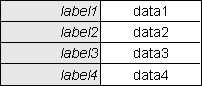
This is a DETAIL view which displays the contents of a single database row in columns going vertically down the page with labels on the left and data on the right, as shown in Figure 5.
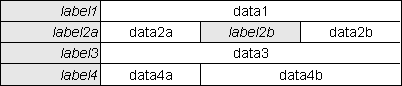
In most cases the standard 2-column view will be sufficient, but there may be cases when it is desired to have more than one piece of data on the same horizontal line, as shown in Figure 6.
It is important to note that it is not a simple case of adding in extra columns to a row. An HTML table expects each row to have the same number of columns, so it is necessary to make adjustments on all other rows otherwise they will contain empty columns. Notice the following points about Figure 6:
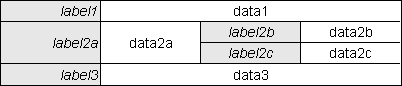
In an HTML table it is possible to have a single piece of data which spans more than one column, as shown in Figure 6. It is also possible to have a single piece of data which spans more than one row, as shown in Figure 7.
Notice here that the effect of spanning multiple rows requires data in the other columns in each of the rows that are being spanned.
Details on how to achieve these effects are given in Structure file for a DETAIL view
The same DETAIL view can be used by different components which access the same business entity in different modes (insert, update, enquire, delete and search) as the controller script will pass its particular mode to the XSL stylesheet during the transformation process. The XSL stylesheet will use the mode value to alter the way that it deals with individual fields by making them read-only or amendable as appropriate.
Here is a sample of the XSL stylesheet which provides a DETAIL view:
<?xml version='1.0'?>
<xsl:stylesheet version="1.0"
                xmlns:xsl="http://www.w3.org/1999/XSL/Transform"
                xmlns="http://www.w3.org/1999/xhtml">

<xsl:output method="xml"
            indent="yes"
            omit-xml-declaration="yes"
            doctype-public = "-//W3C//DTD XHTML 1.0 Strict//EN"
            doctype-system = "http://www.w3.org/TR/xhtml1/DTD/xhtml1-strict.dtd"
/>

<!-- include common templates -->
<xsl:include href="std.buttons.xsl"/>
<xsl:include href="std.column_hdg.xsl"/>
<xsl:include href="std.data_field.xsl"/>
<xsl:include href="std.head.xsl"/>
<xsl:include href="std.pagination.xsl"/>

<!-- get the name of the MAIN table -->
<xsl:variable name="main" select="//structure/main/@id"/>
<xsl:variable name="numrows">1</xsl:variable>

<xsl:template match="/">

  <html xml:lang="{/root/params/language}" lang="{/root/params/language}">
    <xsl:call-template name="head" />
  <body>

  <form method="post" action="{$script}">

    <div class="universe">

      <!-- create help button -->
      <xsl:call-template name="help" />

      <!-- create menu buttons -->
      <xsl:call-template name="menubar" />

      <div class="body">

        <h1><xsl:value-of select="$title"/></h1>

        <!-- create navigation buttons -->
        <xsl:call-template name="navbar_detail" />

        <div class="main">
          <!-- table contains a row for each database field -->
          <table>

            <!-- process the first row in the MAIN table of the XML file -->
            <xsl:for-each select="//*[name()=$main][1]">

              <!-- display all the fields in the current row -->
              <xsl:call-template name="display_vertical">
                <xsl:with-param name="zone" select="'main'"/>
              </xsl:call-template>

            </xsl:for-each>

          </table>
        </div>

        <!-- look for optional messages -->
        <xsl:call-template name="message"/>

        <!-- insert the scrolling links for MAIN table -->
        <xsl:call-template name="scrolling" >
          <xsl:with-param name="object" select="$main"/>
        </xsl:call-template>

        <!-- create standard action buttons -->
        <xsl:call-template name="actbar"/>

      </div>

    </div>

  </form>
  </body>
  </html>

</xsl:template>

</xsl:stylesheet>
Full a full breakdown of the different parts within the XSL stylesheet please refer to Reusable XSL Stylesheets and Templates.
This is a LIST view which displays the contents of several database rows in horizontal rows going across the page. The top row contains column headings (labels) while the subsequent rows contain data, each row from a different database occurrence.
Here is a sample of the XSL stylesheet which provides a LIST view:
<?xml version='1.0'?>
<xsl:stylesheet version="1.0"
                xmlns:xsl="http://www.w3.org/1999/XSL/Transform"
                xmlns="http://www.w3.org/1999/xhtml">

<xsl:output method="xml"
            indent="yes"
            omit-xml-declaration="yes"
            doctype-public = "-//W3C//DTD XHTML 1.0 Strict//EN"
            doctype-system = "http://www.w3.org/TR/xhtml1/DTD/xhtml1-strict.dtd"
/>

<!-- include common templates -->
<xsl:include href="std.buttons.xsl"/>
<xsl:include href="std.column_hdg.xsl"/>
<xsl:include href="std.data_field.xsl"/>
<xsl:include href="std.head.xsl"/>
<xsl:include href="std.pagination.xsl"/>

<!-- get the name of the MAIN table -->
<xsl:variable name="main" select="//structure/main/@id"/>
<xsl:variable name="numrows" select="//pagination/page[@id='main']/@numrows"/>

<xsl:template match="/"> <!-- standard match to include all child elements -->

  <html xml:lang="{/root/params/language}" lang="{/root/params/language}">
    <xsl:call-template name="head" />
  <body>

  <form method="post" action="{$script}">

    <div class="universe">

      <!-- create help button -->
      <xsl:call-template name="help" />

      <!-- create menu buttons -->
      <xsl:call-template name="menubar" />

      <div class="body">

        <h1><xsl:value-of select="$title"/></h1>

        <!-- create navigation buttons -->
        <xsl:call-template name="navbar">
          <xsl:with-param name="noshow"   select="//params/noshow"/>
          <xsl:with-param name="noselect" select="//params/noselect"/>
        </xsl:call-template>

        <div class="main">

          <!-- this is the actual data -->
          <table>

            <!-- set up column widths -->
            <xsl:call-template name="column_group">
              <xsl:with-param name="table" select="'main'"/>
            </xsl:call-template>

            <thead>
              <!-- set up column headings -->
              <xsl:call-template name="column_headings">
                <xsl:with-param name="table" select="'main'"/>
              </xsl:call-template>
            </thead>

            <tbody>
              <!-- process each non-empty row in the MAIN table of the XML file -->
              <xsl:for-each select="//*[name()=$main][count(*)>0]">

                <!-- display all the fields in the current row -->
                <xsl:call-template name="display_horizontal">
                  <xsl:with-param name="zone" select="'main'"/>
                </xsl:call-template>

              </xsl:for-each>
            </tbody>

          </table>

        </div>

        <!-- look for optional messages -->
        <xsl:call-template name="message"/>

        <!-- insert the page navigation links -->
        <xsl:call-template name="pagination">
          <xsl:with-param name="object" select="'main'"/>
        </xsl:call-template>

        <!-- create standard action buttons -->
        <xsl:call-template name="actbar"/>

      </div>

    </div>

  </form>
  </body>
  </html>

</xsl:template>

</xsl:stylesheet>
There are more details available in the RADICORE Infrastructure guide.
Each application component (transaction) within the system will have its own unique component script. Although this is not sharable, it is a very small script which does nothing but identify which Model, View and Controller to use, most of which are sharable. This arrangement allows me to achieve the following levels of reusability:
Using this design I have built framework which contains the following:
Using this framework I have built an application which contains over 2,000 user transactions, 250+ database tables and 450+ relationships. Each database table (Model) class was generated from my Data Dictionary and automatically shared code from my abstract table class and Data Access Object. Each user transaction was generated from one of my Transaction Patterns and automatically shared one of my Controller scripts and one of my View objects.
In my implementation I can add a new table to my database, import the details into my Data Dictionary, create the class file for the Model then create the initial transactions for the LIST1, SEARCH1, ADD1, ENQUIRE1, UPDATE1 and DELETE1 patterns, and be able to run them from my menu system, in under 5 minutes without having to write a single line of code. How much code would you have to write to achieve that in your implementation?
In your implementation how much code do you have to write for each Model in order to produce a working transaction? In mine it is none as the model classes are generated from my Data Dictionary and inherit a large amount of code from my abstract table class.
In your implementation how much code do you have to write to validate user input? In mine it is none as all user input is automatically validated using my standard validation object which compares each field's value with the field's specifications provided by the table structure file.
In your implementation how much code do you have to write for each View in order to produce a working transaction? In mine it is none as each HTML page is created from a pre-built View object which uses one of my pre-defined XSL stylesheets.
In your implementation how much code do you have to write for each Controller in order to produce a working transaction? In mine it is none as each transaction uses one of my pre-defined controller scripts.
In your implementation how many Controllers are tied to a particular Model and are therefore not sharable?. In mine I have 43 controllers which can operate on any Model, so they are infinitely sharable.
If your implementation cannot achieve the same levels of reusability/sharability as mine then please do not try to tell me that my implementation is inferior.
More information regarding the levels of reusability which I have achieved can be found in the following:
Criticism #1: The View must get its data from the Model
In this forum post someone asked advice on how the MVC pattern should be implemented, so I decided to offer some based on my experience of having successfully implemented the MVC pattern in a large web application. It seems that quite a few people took exception to my approach as it violated their personal interpretations of the rules of MVC.
In this post I stated the following:
Should the Model transmit its changes directly into the View, should the View extract the changes directly from the Model, or should the Controller extract from the Model and inject into the View? Actually, there is no hard and fast rule here, so any of these options would be perfectly valid.
TomB responded with this:
Well in MVC the view gets its own data from the model. Controller extracting from the model and passing to the view is wrong.
In this post he said:
MVC states that views access the model directly (ie not using the controller as a mediator) and that models should not know of controllers and views.
His opinion differs from that expressed in the Gang of Four book which has this to say about the MVC design pattern:
MVC decouples views and models by establishing a subscribe/notify protocol between them. A view must ensure that its appearance reflects the state of the model. Whenever the model's data changes, the model notifies the views that depend on it. In response, each view gets the opportunity to update itself. This approach lets you attach multiple views to a model to provide different presentations. You can also create new views for a model without rewriting it.
TomB has reinforced his opinion in an article entitled Model-View-Confusion part 1: The View gets its own data from the Model. What he fails to realise is that different examples of MVC implementations show different ways in which the model obtains its data, so he cites the ones that follow his personal opinion as being "right" and dismisses all the others as being "wrong".
I feel that his interpretation of the statement "models should not know of controllers and views" goes too far. A model may have any of its methods called by another object, or may call a method on an object of unknown origin which has been injected into it, but it should not have any hard-coded dependencies on specific view objects or any methods which are tied to specific objects as this would introduce tight coupling between those objects. By using generic methods which can be used by multiple objects you are introducing loose coupling which makes the code more maintainable and less prone to error. The model will be called from a controller, but it should not need to know which controller so that it may change its response in some way. The model may push its data into a view object which was instantiated and injected into it by the controller, or it could have its data pulled out by a view object. In either case it should not need to know which view or controller requested that data, it should simply return the data and let the calling object do what it wants with it, which may be to render that data it whatever form is appropriate, which could be HTML, PDF, CSV or whatever.
My point of view is reinforced by How to use Model-View-Controller (MVC) which lists the following in the Basic Concepts section:
In the MVC paradigm the user input, the modeling of the external world, and the visual feedback to the user are explicitly separated and handled by three types of object, each specialized for its task.The formal separation of these three tasks is an important notion that is particularly suited to Smalltalk-80 where the basic behavior can be embodied in abstract objects: View, Controller, Model and Object. The MVC behavior is then inherited, added to, and modified as necessary to provide a flexible and powerful system.
- The view manages the graphical and/or textual output to the portion of the bitmapped display that is allocated to its application.
- The controller interprets the mouse and keyboard inputs from the user, commanding the model and/or the view to change as appropriate.
- the model manages the behavior and data of the application domain, responds to requests for information about its state (usually from the view), and responds to instructions to change state (usually from the controller)
Although this document was written with Smalltalk-80 in mind, these basic concepts can be implemented in any language which has the appropriate capabilities.
Notice that it concentrates on the responsibilities of the three components, and does nothing but "suggest" how the data may flow between them. Note the use of the term "usually" in the above list, and the phrase "commanding the model and/or the view to change as appropriate." Later in the same document you may find references to particular implementations, but as far as I am concerned these are suggested implementations by virtue of the fact that the words used are can, could and may. These are not imperatives such as must, should or will, and as such should not be regarded as required in any implementations.
This Wikipedia article contains the following:
In addition to dividing the application into three kinds of components, the MVC design defines the interactions between them.
- A controller can send commands to its associated view to change the view's presentation of the model (e.g., by scrolling through a document). It can also send commands to the model to update the model's state (e.g., editing a document).
- A model notifies its associated views and controllers when there has been a change in its state. This notification allows the views to produce updated output, and the controllers to change the available set of commands. A passive implementation of MVC omits these notifications, because the application does not require them or the software platform does not support them.
- A view requests from the model the information that it needs to generate an output representation.
So even in this definition there are several possibilities:
Note that the word used is can and not should or must.
Which variation of these options you choose to implement is therefore down to your personal preferences or what options are available in your design.
So even though the MVC pattern does not (or should not, IMHO) dictate how the flow of data should be implemented, whether it should be pulled or pushed, or who should do the pulling or the pushing, TomB seems to think that the only implementations which are allowed are those which have received his personal seal of approval. Isn't this a little arrogant on his part?
Criticism #2: Ordering and limiting data is display logic which belongs in the View
In this post TomB stated:
By state I meant does the model contain a 'current record set'. Selecting which records to show is clearly display logic (along with ordering and limiting).
I replied in this post with the following:
I disagree (again). The Model contains whatever records it has been told to contain, either by issuing an sql SELECT statement, or by having data injected into it from the Controller. The View does not *request* any particular records from the Model, it deals with *all* records that are currently contained in the Model. Ordering and limiting are data variables which are passed from the Controller, through the Model and to the DAO so that they can be built into the sql SELECT statement. The View does *not* decide how to limit or sort the data - the data which it is given has already been sorted and limited.
TomB argued in this post with the following:
Ordering, limiting and generally deciding which records to show is 100% display logic. By moving this to the model you've reduced reusability of the view.
I don't know about you, but if there are 1,000s of records to display, but the user wants to see them in pages of 10, it is much more efficient, both in time and memory, for the Model/DAO to use limit and offset values so that only the relevant records are actually read from the database. All of these records are then passed to the View, and the View displays every record which it has been given. It just does not sound practical to pass 1,000s of records to the View, then get the View to decide which 10 to display. Similarly it is far easier to sort the records by adding order by to the SQL query than it is to have code to sort them in the View.
This is no way reduces the reusability of the view as all HTML output is produced from a single pre-written View object which uses one of my pre-written XSL stylesheets. This single object can be used to create the HTML output for any transaction and any Model. What could be more reusable than that?
Criticism #3: You don't understand what "display logic" actually means
There also seems to be some dispute over what the term "display logic" actually means. A software application can be broken down into the following types of logic:
It is clear to me that display logic is that code which directly generates the HTML output. The data which is transformed into HTML may come from any source, but the code which obtains or generates that data is not part of the display logic. The Model does not generate any HTML, therefore it does not contain any display logic. Similarly the Model does not generate and execute any SQL queries, therefore it does not contain any data access logic. This can be summed up as follows:
I'm sorry if my interpretation of these minor details is different to yours, but just because my interpretation is different does not mean that it is wrong. I still have components which carry out the responsibilities of Model, View and Controller, so as far as I am concerned my version of MVC is perfectly valid. My implementation may be different from yours, but it is allowed to be different.
Criticism #4: A Controller can only talk to a single Model
According to some people there is supposed to be a rule which says that a Controller can only ever communicate with a single Model, but as I have never heard of this rule and have never been given any justification for its existence I see no reason to be bound by it. In my implementation each HTML page is broken down into a series of zones or areas, and each zone is populated using the contents of a different object as follows:
In all my previous programming languages I was able to populate different areas on the screen from different tables in the database, so I saw no reason why I should not do exactly the same with PHP. Each of my page controllers will deal with each of those applications objects independently and separately, regardless of the number, and not through any single composite object.
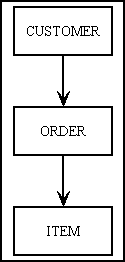
For example, take three database tables which are related as shown in Figure 9:
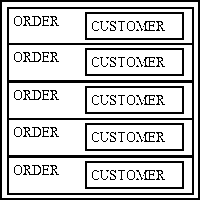
A typical screen will list multiple rows from the ORDER table in a single zone using the LIST1 pattern as shown in Figure 10. Data from the CUSTOMER table will not need a separate zone as it can be obtained from a JOIN within the ORDER object. Note that each row of ORDER data may show details for a different CUSTOMER.
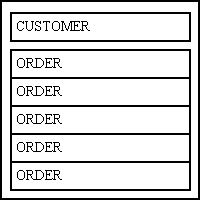
A variation of this may show only those ORDERs for a single CUSTOMER using the LIST2 pattern, as shown in Figure 11. Here the CUSTOMER table has its own zone which displays one row at a time. This is separate from and in addition to the ORDER zone which can display multiple rows. Only those ORDERS which are related to the current CUSTOMER will be shown.
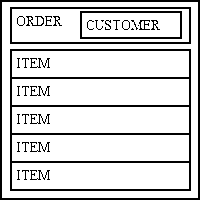
Another screen may only show those ITEMs for a single ORDER using the LIST2 pattern, as shown in Figure 12. Here the ORDER table has its own zone which displays one row at a time. This is separate from and in addition to the ITEM zone which can display multiple rows. Only those ITEMs which are related to the current ORDER will be shown. Any CUSTOMER data is obtained using a JOIN within the ORDER object.
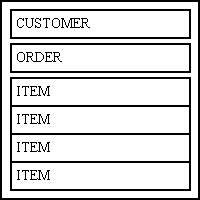
Another screen may only show those ITEMs for a single ORDER for a single CUSTOMER using the LIST3 pattern, as shown in Figure 13. Here the CUSTOMER table has its own zone which displays one row at a time. This is separate from and in addition to the ORDER zone which can also only display one row at a time, and the ITEM zone which can display multiple rows. Only those ITEMs which are related to the current ORDER which are related to the current CUSTOMER will be shown.
The idea of forcing the page controller to go through a single composite object in order to deal with the separate database objects never occurred to me. Doing so would require extra effort which would achieve absolutely nothing (except to conform to a rule which I did not know existed) so as a follower of the KISS principle it is my choice, if not my duty, to avoid unnecessary complexity and stick with the simplest thing that could possibly work.
Criticism #5: MVC is not suitable for the web
While not a direct criticism of my approach, a blog written by Fabien Potencier (who created the Symfony framework), contains the following statement:
I don't like MVC because that's not how the web works. Symfony2 is an HTTP framework; it is a Request/Response framework.
In my opinion anyone who says that the MVC design pattern is not suitable for the web has a blinkered mind which is being constrained by the circumstances in which that pattern was created and the way it was first implemented. It was originally designed for and implemented in a language which ran in a stateful environment on the desktop using a compiled language and a bitmapped display, and where it was possible for every keystroke to be detected by the program and to have an immediate effect on the output. Twenty plus years later the internet arrived with a totally different stateless protocol with its HTTP Request/Response cycle in which individual keystrokes are not detected - the client sends a request to the server, the sever processes that request and responds with a complete HTML document which causes the whole display to be rebuilt.
If you bother to look at the description of MVC its says nothing about being tied to software which runs in a stateful environment using a bitmapped display where every keystroke can be detected and processed. MVC is nothing more than a design which identifies three components which each have their own distinct and separate responsibilities. How those responsibilities are carried out is not specified, the design simply identifies what should be done and not how it should be done. MVC is not tied to a particular language, or a particular protocol, nor is it limited to a particular implementation. That blog also contains the following statement:
... because the MVC word is so overloaded and because nobody implements exactly the same MVC pattern anyway.
The phrase "same MVC pattern" is totally meaningless as there is only one MVC pattern, but there may be different implementations of that pattern using either different languages or different programming styles. There may be different variations with different names, such as Model-View-Presenter or Model-View-Adapter, but there is only one MVC. Provided that your software has three components which fulfil the responsibilities of the Model, View and Controller then you definitely have an implementation of MVC, and anyone who says otherwise is mistaken. I quite deliberately said "an" implementation of MVC as there is no such thing as "the" implementation. For example, with PHP applications the View component may use a templating system such as Smarty or one of the many other templating engines. Personally I prefer to use XSL. Some people put data validation in the Controller (which then results in a Fat Controller and a Thin Model), but I prefer to keep it in the Model with the other business logic. This means that all knowledge of any application is confined to the Model/Business layer while both the Presentation and Data Access layers are application-agnostic by virtue of the fact they do not contain any knowledge of any application. Controllers, Views and DAOs are supplied with the framework while individual Model classes are generated by the framework using table structures obtained from the application database which is designed and built by the developer.
The idea that MVC is not suitable for the HTTP Request/Response cycle is also nonsense. Take a look at Figure 14:
Figure 14 - Request/Response cycle with MVC
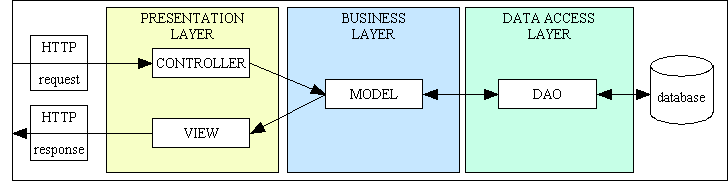
In my framework this is implemented in the following steps:
My implementation contains three components which carry out the responsibilities of the three components which are described in MVC, so anyone who says it is not MVC is mistaken. It also runs on the web, so anyone who says that MVC is not suitable for the web is mistaken.
Criticism #6: Data validation must not be performed within the Model
This argument was not aimed directly at my implementation in particular, but was expressed as a new "rule" invented by Matthias Noback in his blog Objects should be constructed in one go in which he said:
Consider the following rule:When you create an object, it should be complete, consistent and valid in one go.
What he is saying here is that valid data MUST be inserted into an object within the constructor as it should not be possible for an object to exist in an inconsistent/invalid state. I posted a comment in which I disagreed with this rule, but being a snowflake who cannot stand honest criticism he deleted my post, which caused me to create my own blog entry called Re: Objects should be constructed in one go.
His new rule was based solely on his misunderstanding and misinterpretation of the word "state", which in the context of software objects can have two meanings:
The ONLY golden rule concerning a constructor is as follows:
A constructor must leave the object in a condition in which it can respond to calls on it public methods
This means that it is permissible for the constructor to leave the object in a valid condition but without any state (data) either valid or invalid. It is permissible to use one or more of the public methods to fill the object with data, and it is permissible to validate the data within the object before it is sent off to its final destination.
My critics take great delight in telling me that my implementation is wrong because it breaks so many of their precious principles, especially SOLID. What they fail to realise is that I am only breaking their interpretation of these principles, and as I consider their interpretation to be seriously flawed I prefer to follow a more moderate and pragmatic interpretation which allows me to implement a practical solution which has as few unpleasant side effects as possible. Following rules which create problems instead of solutions is not my idea of good programming.
Figure 15 - A typical Family of Forms
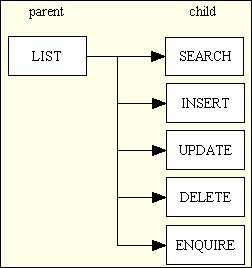
Each of these tasks is a separate user transaction with its own Controller. Each Controller is dedicated to that single task by calling different sets of methods on the same Model.
There are some people, however, who think that this group of tasks represents a single Use Case and therefore build a single Controller to handle all of these tasks. I gave up this idea in the 1980s when I realised the advantages of breaking it down into smaller units as documented in Component Design - Large and Complex vs. Small and Simple. A Controller which is responsible for handling multiple tasks is, IMHO, breaking the Single Responsibility Principle and should therefore be avoided. My implementation uses a separate Controller for each task, but instead of hard-coding the Model name within the Controller I use a form of Dependency Injection to pass the Model name to the Controller by means of a small component script. This means that I can use the same Controller to perform the same task on any Model in my application, and as I currently have over 450 different Models that is a HUGE amount of reusable code.
My library of reusable Controllers goes far beyond the six shown above. I currently have over 40 which are documented in Transaction Patterns for Web Applications. I have also automated the creation of new tasks by having a function where the developer can select a database table (Model) select a Transaction Pattern (Controller) then press a button to create all the necessary scripts for perform that task. Because each task is also a separate entry in the MENU database it therefore allows all access to the task to be controlled by the framework. This would be more difficult if multiple tasks were performed by the same Controller.
You should be ale to see that by following a reasonable interpretation of the Single Responsibility Principle I have been able to create small but highly specialised components which are completely reusable. This in turn makes it easier for me to create new components and maintain existing ones. If you cannot match my levels of productivity then any complaint that my implementation of MVC is somehow wrong or inferior will be met with howls of laughter.
The following articles describe aspects of my framework:
The following articles express my heretical views on the topic of OOP:
These are reasons why I consider some ideas on how to do OOP "properly" to be complete rubbish:
Here are my views on changes to the PHP language and Backwards Compatibility:
The following are responses to criticisms of my methods:
Here are some miscellaneous articles:
| 25 Jul 2021 | Added Criticism #6: Data validation must not be performed within the Model. |
| 01 Mar 2018 | Added Counter Criticisms |
| 01 Sep 2017 | Updated Screen Structure File to include the label-only option. |
| 01 Oct 2015 | Added Criticism #5: MVC is not suitable for the web. |
| 15 Apr 2014 | Added Criticism #4: A Controller can only talk to a single Model. |
| 14 Jun 2013 | Restructured the document into a more logical sequence, added new sub-sections for the Model, View and Controller objects, and turned the items in Figure 3 into clickable links. |
| 30 Apr 2012 | Added details about the View object. |
| 01 Aug 2011 | Modified XSL (screen) Structure file to change the way that the 'align' and 'valign' attributes are handled in LIST screens as they are poorly supported in most browsers, and not supported at all in HTML5. |
| 26 Jun 2010 | Modified How they fit together to include some additional comments.
Added Criticisms of my implementation. |
| 01 May 2010 | Modified Screen Structure file for a DETAIL view to allow the cols and rows attributes. |
| 01 Feb 2010 | Modified Screen Structure file for a DETAIL view to allow the align and valign attributes. |
| 01 May 2007 | Modified Screen Structure file for a DETAIL view to allow for the addition of a class attribute on both the label and field specifications. |
| 09 Aug 2006 | Modified Screen Structure file for a DETAIL view to allow for additional options for use with javascript, as documented in RADICORE for PHP - Inserting optional JavaScript - Hide and Seek. |
| 21 July 2006 | Modified Screen Structure to allow for a wider range of attributes on the column specifications. |
| 21 June 2005 | Modified the contents of XSL Stylesheet and Screen Structure file. |
| 17 June 2005 | Moved all descriptions of the contents of the Business Entity Class to A Data Dictionary for PHP Applications. |