
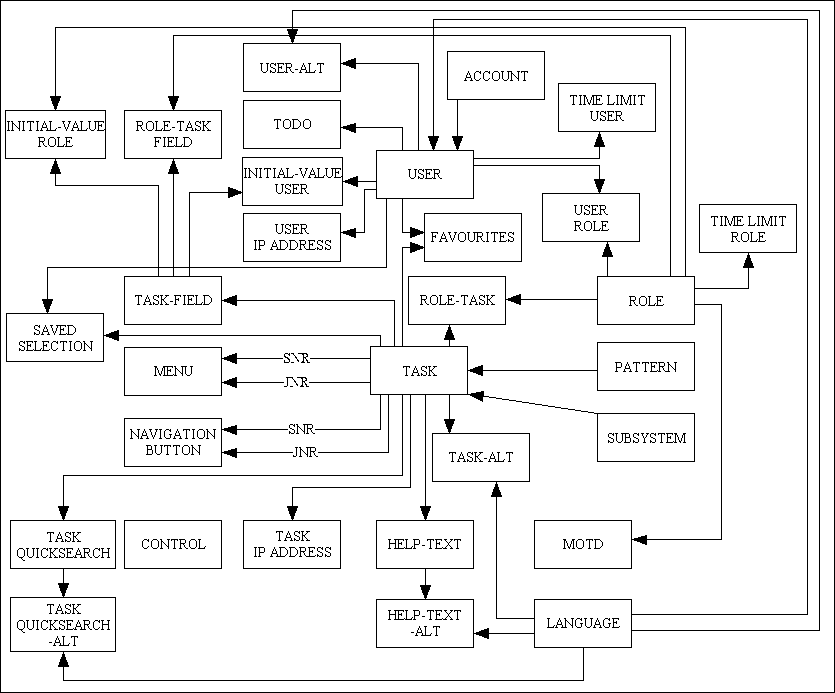
Each box in this diagram represents a separate table (entity) within the menu database. A line between two tables signifies that a relationship exists between those tables. Each relationship is of the ONE-to-MANY variety; therefore the arrow at one end of the line indicates which of the two is the MANY entity, as in:

Here is an explanation of the tables in my database:
| ACCOUNT | This contains an entry for each account, and is only used where database tables hold data for different accounts and where the data for each account is only visible to users within that account. Please refer to Implementing Virtual Private Databases for details. |
| CONTROL | This holds control data, equivalent to a file of configuration options. |
| FAVOURITES | This holds the favourite tasks for each USER. |
| HELP-TEXT | This holds the 'help' text for the TASK in the default language. Text in other supported languages, as identified on the LANGUAGE table, will be maintained on a separate HELP_TEXT_ALT table.
When the HELP hyperlink is pressed the help text for that Task will be retrieved from the appropriate database table according to the User's language. |
| HELP-TEXT-ALT | This holds the translated 'help' text for the TASK in the supported languages as identified on the LANGUAGE table. Text for the default language is held in a separate HELP-TEXT table. |
| INITIAL-VALUE-ROLE | This is used to define the initial value for a field when a specified TASK is run by a USER within a specified ROLE. This table has two uses:
|
| INITIAL-VALUE-USER | This is used to define the initial value for a field when a specified TASK is run by a specific USER. This table has two uses:
|
| LANGUAGE | Of all the possible languages which exist, this identifies those which are actually supported by the current application. Please refer to Appendix O: Internationalisation for details. |
| MENU | Entries on the TASK table which are of type 'MENU' require to have their contents maintained on the MENU table. These can be arranged into a hierarchy of different menu pages.
When a USER selects a menu the contents of the MENU table are retrieved and displayed in the menu bar area. By using the entries on the ROLE-TASK table any MENU option which is not accessible to the User can be filtered out, thus restricting the display to only those options which the User is actually allowed to access. TASK_ID_SNR identifies the menu page while TASK_ID_JNR identifies an option on that page. |
| MOTD | This stores 'Message Of The Day' entries. |
| NAVIGATION BUTTON | There are some child tasks which cannot be made available until a relevant parent task is active, and these child tasks are displayed in the parent task's navigation bar. This is because the child tasks require context to be passed down to them, and context is supplied by the parent task. For example, you must select one or more entries in a LIST form before you can pass control to an UPDATE, ENQUIRE or a DELETE form.
By using the entries on the ROLE-TASK table any NAVIGATION BUTTON option which is not accessible to the user can be filtered out, thus restricting the display to only those options which the User is actually allowed to access. TASK_ID_SNR identifies the parent component while TASK_ID_JNR identifies a child component. |
| PATTERN (DIALOG_TYPE) | Each TASK conforms to one of the patterns in Transaction Patterns for Web Applications, and I have found it very useful to have this as an identifier on each TASK record. For example, when selecting entries for the ROLE-TASK (permissions) table I can very quickly isolate all the tasks of any particular pattern/template. |
| ROLE | This is a method of dividing USERS into groups so that members of each group can share a common set of permissions. The TASKS which a Role can access are specified on the ROLE-TASK table. |
| ROLE-TASK | This identifies which TASKS can be accessed by which ROLES and is sometimes known as the access profile, security profile, permissions list or access control list. This table only contains entries where a particular combination of ROLE and TASK is valid. |
| ROLE-TASK-FIELD | This is used in conjunction with TASK-FIELD to change a ROLE's access to a field within a particular TASK. The access options are:
|
| SAVED-SELECTION | This is used to save and restore selections from a task built using the OUTPUT 4 pattern. Entries are identified by TASK and by USER, but there can be different selections for the same task/user with different descriptions. |
| SUBSYSTEM | Each application or system can often be broken down into discrete parts (domains or subsystems) which can be regarded as separate collections of components or TASKS. For example, 'Menu and Security' is separate from 'Workflow' which is separate from 'Product' which is separate from 'Customer'. The files for each subsystem may exist in a separate directory. It is quite often that a ROLE will have responsibility in only one of these areas, therefore it is useful to have this as part of the selection criteria when maintaining access permissions. |
| TASK | This contains an entry for each task within the system. These are sometimes referred to as 'transactions', 'modules' or 'functions'. Two types of task are supported:
|
| TASK-ALT | This holds the translated text for the TASK in the supported languages as identified on the LANGUAGE table. Text for the default language is held on the TASK table. |
| TASK-FIELD | This is used to define the fields within a TASK that can manipulated further via entries on the ROLE-TASK-FIELD, INITIAL-VALUE-USER and INITIAL-VALUE-ROLE tables. |
| TASK-QUICKSEARCH | This identifies all the options that will appear in the QuickSearch bar for this task. The first option will be shown as the default selection. |
| TASK-QUICKSEARCH-ALT | This holds the translated text for the TASK-QUICKSEARCH table in the supported languages as identified on the LANGUAGE table. Text for the default language is held on the TASK-QUICKSEARCH table. |
| TASK-IP-ADDRESS | This identifies all the IP addresses which are valid for this TASK. If there are no IP address entries for a Task then there are no restrictions on that Task, and the task may be accessed from any device. If there are any entries then access is only permitted from a device with an address which is in that list of entries. |
| TIME-LIMIT-ROLE | This identifies all the time periods which are valid for USERS within this ROLE. If there are no entries for a Role then there are no time limits for that Role. If there are any entries then access is only permitted between the specified range of times on the specified days. Multiple entries are allowed in order to specify multiple time periods. |
| TIME-LIMIT-USER | This identifies all the time periods which are valid for a USER. If there are no entries for a User then there are no time limits for that User. If there are any entries then access is only permitted between the specified range of times on the specified days. Multiple entries are allowed in order to specify multiple time periods. |
| TODO | This holds the "to do" list for individual USERS. |
| USER | This contains an entry for each person who is allowed to access the system. It is used by the LOGON screen to verify the userid and password. |
| USER-ALT | This allows a user to have a different name in different languages. |
| USER-IP-ADDRESS | This identifies all the IP addresses which are valid for this USER. If there are no IP address entries for a User then there are no restrictions on that User, and the user may access the system from any device. If there are any entries then access is only permitted from a device with an address which is in that list of entries. |
| USER-ROLE | This identifies all the ROLES to which a USER belongs. Each user must have a primary Role, plus any number of secondary Roles. |
